Information Technology
Getting Started with Windows 8
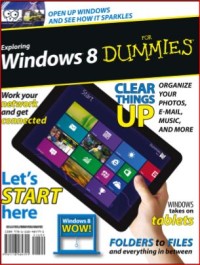
It’s the Windows for every- thing: Windows 8 is the first version of Windows designed to run on desktop PCs, laptops, and touch-based PC tablets. To do that, it brings a whole new way of working with Windows called the Start screen environment (some- times known by its code name, Metro). The Start screen is a sleek, tile-based user interface designed especially for touch- screen users and is based on Microsoft’s Windows Phone operating system for smartphones. Keyboard-and-mouse users can work with the Start screen, too — it’s the face of Windows that you see every time you start your PC.
But fear not: The familiar Windows 7 desktop remains available as well on almost all Windows PCs, and you’ll use the Windows Desktop to run your familiar Windows applications, now called Windows Desktop apps. Essentially, you have two PCs in one with Windows 8 — the Start screen side and the Windows Desktop side — and you switch between the two as you use your PC, as explained later on.
Availability
No copy data
Detail Information
- Series Title
-
-
- Call Number
-
-
- Publisher
- : ., 2015
- Collation
-
1-29
- Language
-
English
- ISBN/ISSN
-
-
- Classification
-
NONE
- Content Type
-
-
- Media Type
-
-
- Carrier Type
-
-
- Edition
-
-
- Subject(s)
- Specific Detail Info
-
-
- Statement of Responsibility
-
-
Other version/related
No other version available
File Attachment
Comments
You must be logged in to post a comment
 Computer Science, Information & General Works
  Philosophy & Psychology
  Religion
  Social Sciences
  Language
  Pure Science
  Applied Sciences
  Art & Recreation
  Literature
  History & Geography